Hercules DJControl AIR
This is one of the cheapest Hercules DJ controllers from Hercules’ leisure DJ controllers brand. There are actually many versions of it:
DJControl AIR (The one shown in picture above)
DJControl AIR Street Edition (Limited Edition)
DJControl AIR S Series
DJControl AIR for iPad
This controller has a built-in soundcard with a mixer output (3.5mm jack) and a headphones output (6.35mm jack).
The main fun and uncommon feature of this controller is its proximity sensor (IR) located above EQ potentiometers and between top horizontal vu-meter.
Uusi versiossa 1.11.
Sound Hardware settings
Sample rate: 44100 Hz
Main Output: Channels 1 - 2
Headphones Output: Channels 3 - 4
Mapping Description
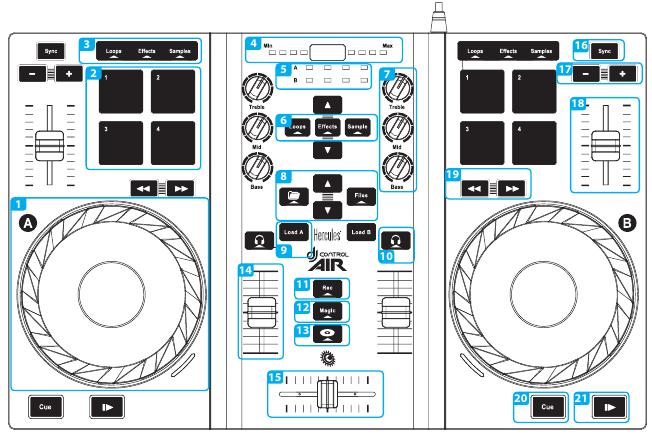
Hercules DJControl AIR (schematic view). This picture is taken from the Getting Started Tutorial (courtesy of Guillemot Corporation S.A.).
We assume from the annotated picture above that each deck has the same controls.
Jogs / Jogs Wheels (1)
Pressing Jogs enables the scratch mode.
PADs (2)
Loops |
Efektit |
Samples |
|
1 |
Loop In |
Flanger (Mixxx 1.10) |
Sample 1 |
2 |
Loop Out |
Align Beat Grid to current position |
Sample 2 |
3 |
Loop Double |
Toggle Quantitize |
Sample 3 |
4 |
Reloop/Exit |
Toggle KeyLock |
Sample 4 |
Proximity Sensor (4)
Currently not mapped
Load track to Deck (9)
This button loads a track to the selected deck (A => Deck 1, B => Deck 2)
Headphone listen (PFL) (10)
This toggles the Pre Fader Listen for the selected Deck(s)
Rec (11)
Currently not mapped
Load selected track to sample (12)
This is done by pressing and holding the Magic button while pressing on the desired sample PAD.
SpinBack(13)
Currently not mapped
Sync (16)
Synchronizes the tempo to the other deck’s tempo (One-time beat sync, tempo/phase).
Speed Adjustment (17)
Adjusts speed slower [ - ] or faster [ + ] in Coarse mode.