Icon iControls
Manufacturer’s product page · Forum thread
Nieuw in versie 2.5.1.
Overview
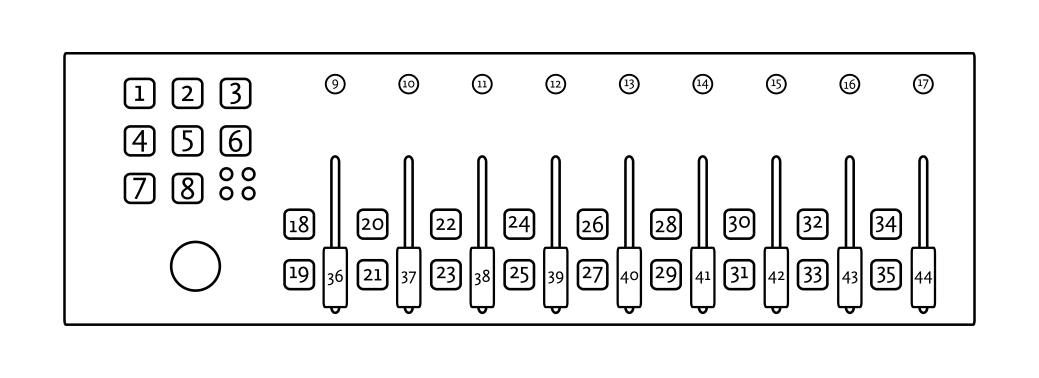
The iControls has 9 faders and rotary encoders, a set of 8 transport buttons, and 2 buttons per fader. There is also a joystick on the left side of the controller that acts as a mouse.
Notitie
The iControls technically supports 4 layers, but only layer 1 is distinguishable from the other layers in the default configuration, so only layer 1 is currently mapped.
Rotary Encoders
Control |
Name |
Functie |
|---|---|---|
9–12 |
e1–e4 |
Deck pregain |
13–16 |
e5–e8 |
Effect super knob |
17 |
e9 |
Main gain |
Faders
Control |
Name |
Functie |
|---|---|---|
36–39 |
f1–f4 |
Deck volume |
40–43 |
f5–f8 |
Deck tempo |
44 |
f9 |
Cross fader |
18 |
— |
Deck 3 Slip Mode |
19 |
— |
Deck 3 PFL |
20 |
— |
Deck 1 Slip Mode |
21 |
— |
Deck 1 PFL |
22 |
— |
Deck 2 Slip Mode |
23 |
— |
Deck 2 PFL |
24 |
— |
Deck 4 Slip Mode |
25 |
— |
Deck 4 PFL |
26 |
— |
Deck 3 Quick Effect Enabled |
27 |
— |
Deck 3 Quick Effect Select |
28 |
— |
Deck 1 Quick Effect Enabled |
29 |
— |
Deck 1 Quick Effect Select |
30 |
— |
Deck 2 Quick Effect Enabled |
31 |
— |
Deck 2 Quick Effect Select |
32 |
— |
Deck 4 Quick Effect Enabled |
33 |
— |
Deck 4 Quick Effect Select |
34 |
— |
Select deck 1 |
34 (long press) |
— |
Select deck 3 |
35 |
— |
Select deck 2 |
35 (long press) |
— |
Select deck 4 |
Transports
The transport buttons currently only affect deck 1 due to limitations in the default controller layout.
Control |
Name |
Functie |
|---|---|---|
1 |
⏪ |
Beatjump backwards |
2 |
⏵ |
Play/pause playback |
3 |
⏩ |
Beatjump forwards |
4 |
🔁 |
Toggle a beat loop |
5 |
⏹ |
If track is playing: stops the track and resets position to the main cue point If playback is stopped: sets the main cue point |
5 |
⏹ (hold) |
Play the track from main cue point, release to stop playback and return to the main cue point. Playback must be initially stopped on the main cue point. |
6 |
⏺ |
Toggle recording the mix |
7 |
- |
Hardware layer select (not used by Mixxx) |
8 |
+ |
Hardware layer select (not used by Mixxx) |
Hint
The actual behavior of CUE and Play/Pause buttons depends on Mixxx settings. See Cue Modi gebruiken for more info.