Numark Party Mix
Manufacturer’s product page · Manufacturer’s user manual · Forum thread
Novo na versão 2.3.4.
Overview
Numark Party Mix
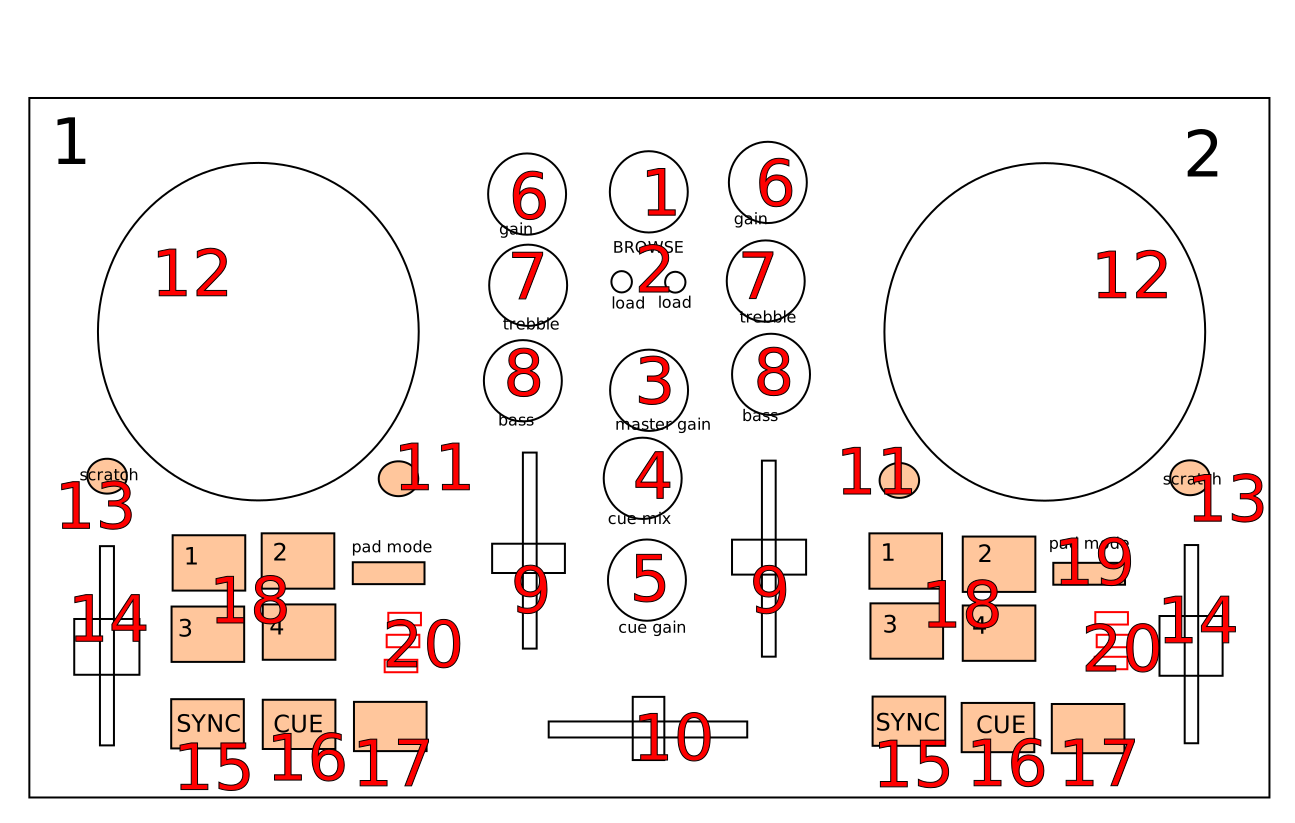
See the tables below for controls descriptions.
Center
# |
Name |
Function |
|---|---|---|
1 |
BROWSE (rotate) |
Browse library |
1 |
BROWSE (press+rotate) |
switch between Library and Sidebar |
1 |
BROWSE (press) |
Equivalent to double clicking the currently selected item in Library (see |
2 |
LOAD 1 and 2 |
load currently selected track to Deck 1 or 2 |
3 |
MASTER GAIN |
Adjust the volume level of master output. |
4 |
CUE MIX |
Head/mix knob. Adjust the cue/main mix in the headphone output. |
5 |
CUE GAIN |
Adjust the headphone volume |
10 |
Crossfader |
Controls the mix between the two decks. See Crossfader |
Deck
Each of those controls exists in both decks and affects only the corresponding deck.
# |
Name |
Function |
|---|---|---|
6 |
GAIN |
Adjust the pre-fader, pre-EQ audio level |
7 |
TREBLE |
Adjust high frequencies |
8 |
BASS |
Adjust low frequencies |
9 |
Channel fader |
Adjust volume level |
11 |
CUE |
Headphone button. Toggle sending channel to the cue (headphone) channel |
12 |
Jog wheel |
If scratch mode is enabled (see the SCRATCH button below): scratch |
13 |
SCRATCH |
Toggle scratch mode. Disabled by default. |
14 |
Pitch fader |
Adjust the speed of the track |
15 |
SYNC |
If sync lock is disabled: set BPM to the other deck’s BPM |
15 |
SYNC (hold, then release) |
Enable sync lock |
16 |
CUE |
If track is playing: stops the track and resets position to the main cue point |
16 |
CUE (hold) |
Play the track from main cue point, release to stop playback and return to the main cue point. Playback must be initially stopped on the main cue point. |
17 |
Play/Pause |
Play/pause playback |
18 |
PADS 1-4 |
Pads 1-4 function depends on selected mode |
19 |
PAD MODE |
Select mode of PADS 1-4 |
20 |
MODE LEDs |
The 4 pads in each deck have multiple functions, depending on the selected pad mode. Default pad mode is hotcues. Current mode is selected by pressing PAD MODE. The LED for currently active pad mode is lit up (or all 3 LEDs for effect mode). |
Dica
The actual behavior of CUE and Play/Pause buttons depends on Mixxx settings. See Usando Modos de Cue for more info.
Pads
# |
Name |
Function |
|---|---|---|
18 |
CUE Mode |
set hotcue if not set. If set, go to hotcue position and start playback. |
18 |
LOOP Mode |
activate auto-loop. |
18 |
SAMPLER Mode |
button for 4 Samples for each Deck 1-4 and 5-8 (toggle play from start and stop). |
18 |
EFFECT Mode |
Pad 1-3 activates effect during press Deck1 of EffectUnit1, Deck2 of EffectUnit2. |
Adjustable values
There are a few configurable values at the top of the script (Numark-Party-Mix.scripts.js).
Variable |
Default value |
Description |
|---|---|---|
|
‘340’ |
‘Scratching sensitivity’ |
|
‘1/8’ |
‘For controlling the alpha-beta filter used in scratching’ |
|
‘1/8/32’ |
‘For controlling the alpha-beta filter used in scratching’ |
|
‘10’ |
‘Jog wheel (pitch bend) sensitivity during play’ |
|
‘1/2’ |
‘Jog wheel (scrub) sensitivity during pause’ |
|
‘[ “4”, “8”, “16”, “32”]’ |
‘Loop sizes for the auto-loop pad mode |
Dica
See here for more info about constants used in scratching.
Alternative Mappings
I am working on alternative mappings for this controller here: Numark Party Mix Mappings